
Google Says My Page Is Indexed So Why Can't Anyone Find It?
 Sachin Gupta24 Sept 2026
Your page is indexed by Google but still not ranking? Learn why indexed pages may not appear prominently in search and how to diagnose the problem using Google Search Console.
Summarize this article with AI
You publish a new page on your website. You wait for Google to find it. Then you open Google Search Console, inspect the URL, and see something that sounds encouraging:
“URL is on Google.”
So you do what almost every website owner does next. You open Google and search for your target keyword. Your page isn't there. You search for the exact title. Still nothing. You try the website name. Maybe the page appears somewhere, but not where you expected. Now you're left wondering:
If Google has indexed my page, why isn't my page showing in Google Search?
This is one of the most common SEO questions because three different concepts are often treated as if they mean the same thing:
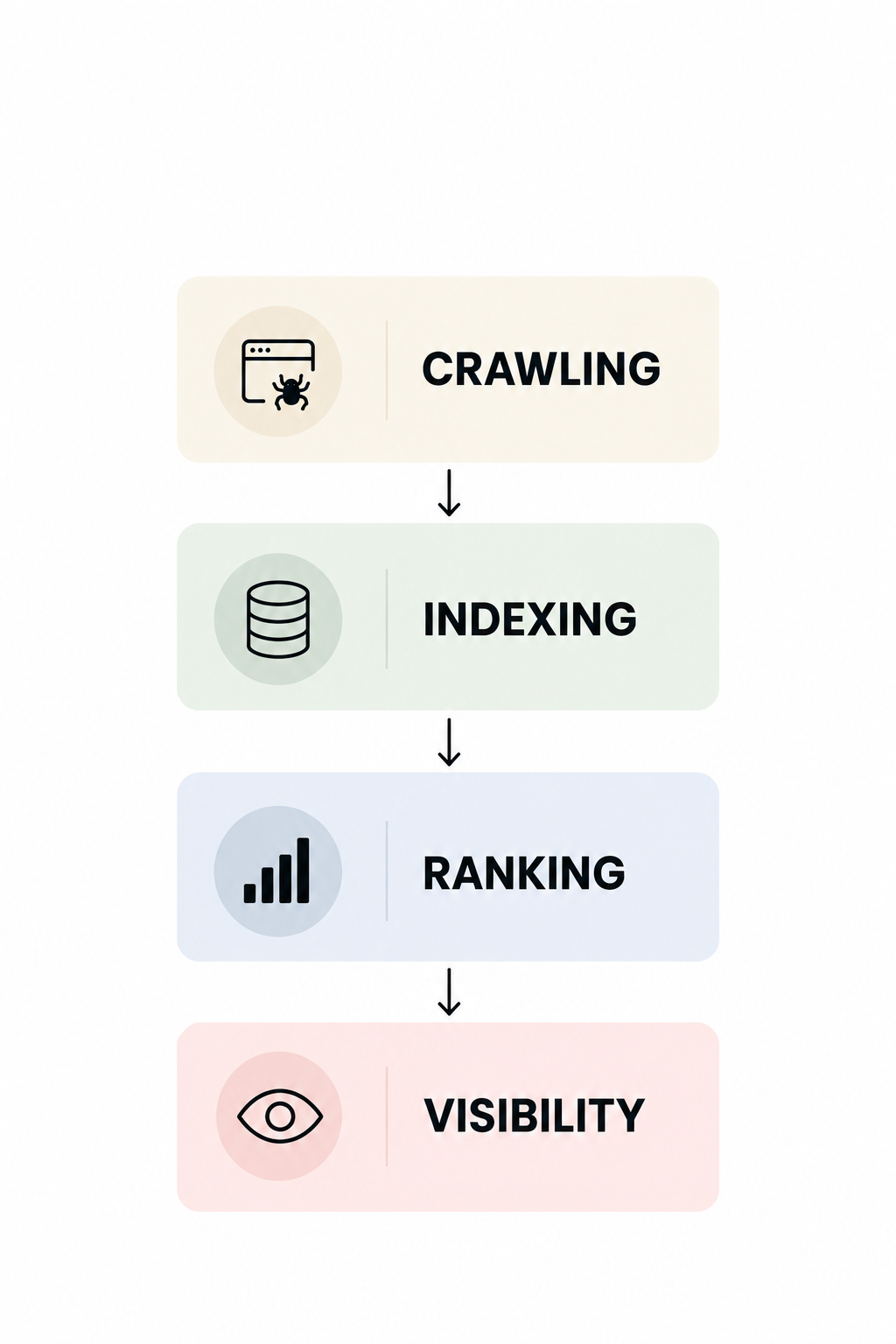
Crawling. Indexing. Ranking.
They don't. Google can discover a page, crawl it, process it, store it in its index, and still not show that page prominently for the search you are checking. Google's own documentation makes this distinction clear: a page being indexed does not guarantee that it will appear in Search results, and being able to find a URL through Search Console is not the same as having a strong ranking for a particular query.So if your website is indexed but not ranking, the first thing to do is not panic and not immediately start changing everything on the page.
First, understand what Google is actually telling you.
The Short Answer
If your page is indexed but you cannot find it on Google, the most likely explanation is that Google knows about your page but isn't choosing it as a prominent result for the particular search you're making.There are many possible reasons. Your page might not match the search intent closely enough. The query might be extremely competitive. Another page on your own website might be a better candidate for the search. Your page may be new and have very little search visibility yet. There could be a canonical or technical issue. Or your page may actually be appearing for related searches that you haven't checked.
There is another important possibility: your manual Google search may not represent what every other person sees.Search results can vary depending on factors such as location, device and other context. Google also explains that Search Console's reported position is an average based on impressions, so the position shown in Search Console will not necessarily match the position you see when you personally perform one search.
That is why the right question isn't simply: “Why isn't my website ranking?” A better question is:“What is Google actually showing my page for, how often is it being shown, and why might it not be getting visibility for the searches I care about?”That question leads to a much more useful SEO investigation.
First: What Does “Indexed” Actually Mean?
Before troubleshooting your rankings, you need to understand what indexing means. Google has to discover a page before it can consider it for Search. Once Google crawls a page, it processes the information it finds and may add the page to its index. The index is essentially Google's large collection of information about pages it knows about. So when Search Console tells you that your URL is indexed, it means Google has processed and included that URL in its searchable index. But indexing is not a ranking promise. Think about it like a library. Imagine you submit a new book to a huge library. The librarian accepts the book and adds it to the library catalogue. Your book now exists in the library. But if someone walks in and asks: “What's the best book about digital marketing?” the librarian doesn't automatically put your book first. The book being in the catalogue means it can potentially be found. It doesn't mean it will be recommended above every other book. Your website works in a similar way. Indexed means Google knows and stores the page. Ranking means Google decides where that page should appear for a particular search. Those are two very different things
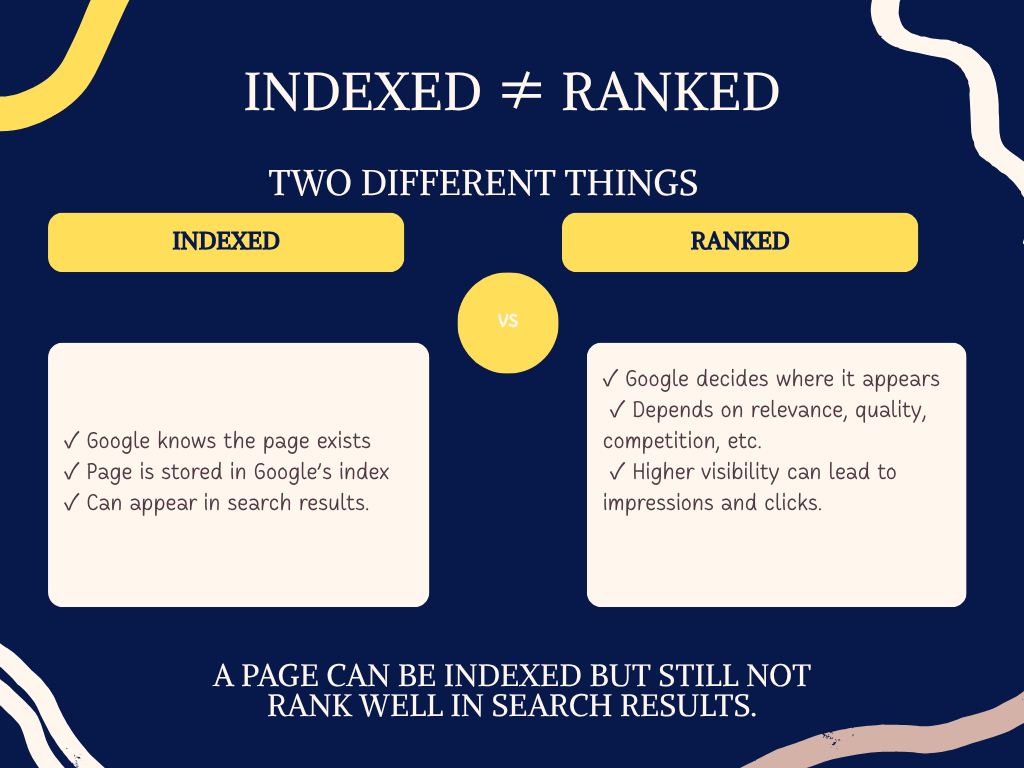
Crawling, Indexing and Ranking: What's the Difference?
These three terms are often mixed together, especially when someone is new to SEO. Understanding the difference will make almost every Search Console problem easier to understand.
Crawling
Crawling is the process through which Google's systems access and process URLs that they discover. Google may discover a URL through internal links, external links, sitemaps and other methods. For example, suppose you publish:
example.com/blog/seo-for-small-business
Google discovers that URL. Googlebot accesses the page. That's crawling. But crawling doesn't mean the page has automatically been added to Google's index.
Indexing
Indexing happens after Google has processed the page and decided that it can include the page in its index. If Search Console says your URL is indexed, Google has an indexed version of the page.But once again, that doesn't mean:
- the page ranks #1;
- the page ranks for your chosen keyword;
- the page appears every time you search;
- the page receives traffic;
- the page will appear for every variation of a search;
- or the page will outrank competing pages.
Google's documentation specifically warns that being indexed does not guarantee that a page will appear in Search results.
Ranking
Ranking happens in the context of an actual search. Someone searches: “digital marketing agency in Delhi” Google has to determine which results are appropriate for that search. Your page might be indexed. Your competitor's page might also be indexed. Another company's page might be indexed. Google then has to decide which pages are relevant to the search and how they should be presented. That's where the difference between being indexed and ranking well becomes important. Your page can exist in Google's index without being one of the strongest results for the keyword you are checking.
Why Is My Website Indexed but Not Ranking?
There isn't one universal reason. In SEO, the same symptom can come from very different causes. One website might have an intent problem. Another might have a technical problem. Another might be targeting a keyword that is simply too competitive. Here are the most important possibilities.
1. Your Page Doesn't Match Search Intent
One of the biggest reasons a page can be indexed but struggle to rank is that the page doesn't fully satisfy what the searcher is trying to accomplish. Search intent simply means:
What does the person actually want when they type that search?
Consider this search:
“How to improve Google rankings”
Someone searching that phrase is probably looking for an explanation or practical guidance.
Now imagine your page is titled:
“Digital Marketing Services in Delhi”
It might mention SEO.
It might even mention Google rankings.
It can be indexed perfectly.
But it isn't primarily designed to answer the question.
Now consider another search:
“How much does SEO cost in India?”
A general article about “What is SEO?” might be related, but it isn't the strongest possible match for someone specifically looking for pricing information.This is why simply placing a keyword inside your content isn't enough. Google needs to understand whether the page actually helps with the searcher's underlying need.
A better approach
Before trying to rank for a keyword, ask: What would a person expect to see after searching this?
If the answer is a guide, create a guide.
If the answer is a comparison, create a comparison.
If the answer is a local business, a service page may be more appropriate.
If the answer is a definition, don't bury the definition beneath 1,500 words of introduction.
The better the match between the search and the page, the more logical the page becomes as a candidate for that query.
2. The Keyword Is More Competitive Than You Realize
Another common situation is that the page is perfectly fine, but the keyword you're targeting is extremely competitive. For example, imagine a relatively new business website creates a page targeting:
SEO
That one word represents a massive topic. You're potentially competing with established agencies, software companies, major publishers, educational websites, specialist SEO publications and other websites that have been building content around the subject for years.
Your page can be:
- indexed;
- technically accessible;
- well written;
- useful;
- and completely legitimate.
It still doesn't mean Google will immediately place it near the top. This is why SEO strategy should not consist of simply finding a keyword with a large search volume and publishing a page for it.
You need to understand:
Who already ranks?
What type of content ranks?
What search intent does Google appear to be satisfying?
How broad or specific is the query?
Can your page provide something genuinely useful?
A specific long-tail search can sometimes be a much more realistic opportunity than a massive generic keyword.For example: SEO is extremely broad. Whereas: why is my website indexed but not ranking has a much clearer question behind it. That doesn't guarantee rankings either, but it gives you a much clearer content purpose.
3. Your Page Is New
A newly published page should not be judged in exactly the same way as an established page. Google explains that crawling and indexing are processes rather than instant events, and requesting indexing does not guarantee that a page will immediately appear in Search. Even after a page is indexed, you shouldn't assume that it will instantly gain meaningful visibility for competitive searches. Think about what happens when you publish a new newspaper article. The article exists.People can potentially find it. But it hasn't automatically built an audience. Search visibility can similarly develop over time. This doesn't mean:
“Wait six months and Google will rank it.” There is no universal SEO timeline. It simply means that indexing is not the end of the process. If your page was published very recently, give the data some time to develop before making major conclusions.
4. You're Checking Only One Keyword
This is one of the easiest mistakes to make. Suppose you publish an article called: How Does Local SEO Work? You decide that your target keyword is: local SEO You search Google for “local SEO.” You don't see your article. You conclude: “My article isn't ranking.” But that's not necessarily what is happening.Your page might already be receiving impressions for searches such as:
- how local SEO works;
- local SEO explained;
- local SEO for small businesses;
- what is local SEO;
- local search optimization;
- local SEO strategy;
- how Google local search works.
Google Search Console's Performance report lets you examine the actual queries that showed your site in Search, along with clicks, impressions, CTR and average position. This is much more informative than repeatedly searching one keyword manually.
5. Your Page May Be Ranking, Just Not Where You Think
Sometimes the page isn't actually “not ranking.”It's simply ranking lower than you expected.For example, you may expect position 5. The page could be appearing around position 45 for some searches. That still means it is appearing in Search. Google Search Console's average position is also easy to misunderstand. It isn't necessarily: “Your page is always position 7.” Search Console calculates position based on impressions and reports an average. Google explains that the position can vary from search to search, and the number shown in Search Console may therefore differ from what you see when you perform a search yourself. For example, your page could appear:
- position 6 for one query;
- position 12 for another;
- position 28 for another;
- position 9 for another.
Search Console may combine those impressions into an average. So don't treat average position as a permanent ranking number.
6. Google May Be Showing a Different Page From Your Website
Sometimes your website has several pages that cover very similar subjects. Imagine your site has:
/seo-services/seo-guide/what-is-seo/seo-for-small-business/seo-company
Now imagine several of those pages discuss almost the same topic. Google has to determine which URL is the most appropriate candidate for a particular search. This is where canonicalization and URL selection become important. Search Console's URL Inspection tool provides information about the URL Google selected as the canonical for a page. If you expected Page A to rank but Google is treating Page B as the canonical or more appropriate version, you need to understand why before simply rewriting Page A. This is one reason creating multiple articles targeting nearly identical keywords is not always a good SEO strategy. More pages do not automatically mean more rankings. Sometimes, better organization and clearer differentiation are more useful.
7. Your Page Has a Technical SEO Problem
A page can look completely normal when you open it in Chrome. That doesn't mean Google is seeing exactly the same thing you are seeing. Technical issues can affect how search engines access, process or understand a page. Depending on the situation, you may need to check:
- whether the page returns a successful HTTP status;
- whether the page is blocked from crawling;
- whether a
noindexdirective exists; - whether the canonical URL is correct;
- whether the page redirects somewhere else;
- whether the page has serious rendering problems;
- whether important content depends on JavaScript;
- whether the page has appropriate internal links;
- whether the page is accessible on mobile;
- whether there are server errors.
Google's URL Inspection tools are designed specifically to help site owners investigate individual URLs and understand indexing-related issues. The important thing is not to randomly change technical elements. Diagnose first. Fix second.
8. Your Page Is Indexed but Has Very Few Impressions
This is where the Search Console becomes extremely useful. Suppose your page is indexed. You open the Performance report. You find: Clicks: 0 Impressions: 4 That tells you something very different from: Clicks: 0 Impressions: 8,000 The first page barely appears. The second page appears frequently but isn't getting clicks. Those are different SEO problems. Google's Performance report provides impressions, clicks, CTR, average position and query/page dimensions specifically so you can understand how your pages perform in Search.
Low impressions may indicate:
- the topic has limited search demand;
- the page isn't yet visible for many relevant queries;
- the page is targeting an extremely competitive topic;
- Google doesn't consider the page a strong match for the searches you're targeting;
- the content is new;
- or there may be other SEO issues worth investigating.
Don't start by changing your title if the page isn't even receiving impressions. First determine why it isn't being shown.
9. Your Page Gets Impressions but No Clicks
This is a completely different situation. Suppose Search Console says: Impressions: 5,000 Clicks: 10 Now Google is showing your page. The problem is that people aren't clicking. At this point, you should examine:
- the average position;
- the search query;
- the title shown in Search;
- the snippet;
- search intent;
- competing results;
- whether the page actually offers what the searcher expects.
Google's Search Console documentation specifically recommends using queries, pages, CTR and related dimensions to understand where users are seeing your site and whether they are clicking. So don't use the same solution for every SEO problem. Low impressions and low CTR are not the same problem.
10. Search Results Can Change by Location and Context
This is another reason people become confused when checking rankings. You search from Delhi. Your customer searches from Mumbai. You use a desktop. They use a mobile phone. You search today. They search tomorrow. The results may not be identical. Google's Search Console documentation also notes that if a query appears in your Performance report, you might not necessarily see your site when you personally run that same query. Google explains that Search results can vary because of factors such as location and search history.This means you shouldn't make a major SEO decision based on one manual search.Instead, use actual Search Console data to understand how Google has been showing your website over time.
What Does “URL Is on Google” Mean?
This message causes a huge amount of confusion. When Search Console says: “URL is on Google” it doesn't mean: “Your page is ranking on page one.” It means the URL is available in Google's index and can potentially appear in Search. Google's URL Inspection documentation specifically explains that being “on Google” does not guarantee that the URL will appear in Search results. So think about the difference: “URL is on Google”Means: The page is indexed. “My page ranks #3” Means: For a particular query and Search context, the page appeared around that position.
Those are entirely different statements.
Why Does Site:example.com Show My Page but Google Search Doesn't?
This is another common question. Suppose you search: site:https://www.digivanta.co/ and Google shows your page. You then search: “best digital marketing agency in Delhi” and your page doesn't appear. That doesn't necessarily mean Google has removed your page. The two searches are asking Google to do different things. The site: search is restricting results to a particular website. The keyword search asks Google to decide which pages are most appropriate for that search. So: Being visible in a site: search does not mean you rank strongly for your target keyword. If you want to understand actual search performance, Search Console's Performance report is more useful because it shows queries for which your site actually received impressions and clicks.
What If My Page Has Zero Traffic?
A page can absolutely be indexed and still have zero or almost zero organic traffic. This doesn't automatically mean something is broken. Traffic depends on whether the page receives impressions, where it appears, which queries trigger it, and whether people click.Imagine two pages.
Page A
Impressions: 20
Clicks: 0
This page is barely appearing.
Page B
Impressions: 20,000
Clicks: 0
This page has a visibility or click-through problem. Those two pages require completely different investigations. This is why looking only at traffic isn't enough.
How to Use Google Search Console to Find the Real Problem
If you genuinely want to understand why a page isn't performing, start with Search Console rather than guessing.
Step 1: Open URL Inspection
Enter the exact URL. Check whether Google has indexed it and review the information available about that URL. Look for:
- indexing status;
- crawl information;
- canonical information;
- potential issues.
Google specifically recommends URL Inspection for investigating individual URLs.
Step 2: Open the Performance Report
Go to: Search results → Performance Then filter the report by the page URL. Now you can see how that specific page has performed. Google's Performance report allows you to analyze:
- queries;
- pages;
- countries;
- devices;
- dates;
- clicks;
- impressions;
- CTR;
- average position.
This is where your investigation becomes much more meaningful.
What Should You Look for in the Search Console?
If impressions are almost zero
Ask: Is Google finding relevant queries for this page?
Then investigate the topic, competition, search intent, content and technical setup.
If impressions are growing
That's useful information. It means Google is showing the page for some searches. Now look at: Which queries? Those queries can tell you how Google understands the page. You may discover that the page is already appearing for related searches you hadn't considered. Google recommends examining queries and pages in the Performance report to understand what searches bring people to your site.
If impressions are high but CTR is low
Now investigate:
- title;
- snippet;
- search intent;
- ranking position;
- competing results;
- whether the result looks useful for the query.
Don't automatically rewrite everything. First look at the actual query.
If clicks are increasing
That's a positive performance signal. Now ask: Which queries and pages are driving that growth? Those patterns can help you decide what related content to create next.
Why Your Average Position in Search Console May Not Match Your Google Search
This question comes up frequently. You check Search Console and see:
Average position: 7.4
Then you search your keyword and see:
Position 11.
You wonder:
“Is the Search Console wrong?” Not necessarily.
Google explains that the position metric is an average based on impressions, and the actual position can vary between searches. Factors such as location and search context can affect what you see. Search Console isn't telling you: “Your page is permanently sitting at exactly position 7.4.” It's reporting an aggregate metric. That's why Google recommends looking at trends and the broader performance data rather than treating one position number as the complete story.
Should You Request Indexing Again?
If the page is already indexed, repeatedly requesting indexing is not a ranking strategy. Google explains that submitting a URL for indexing asks Google to crawl the URL, but it does not guarantee that Google will index it or rank it. So this isn't a useful SEO workflow:
Request indexing → wait two days → request again → wait → request again
If the page is already indexed, ask a better question: Why isn't the page getting enough visibility for the searches I care about? That moves your attention from indexing to actual SEO performance.
Should You Add More Keywords?
Not automatically. If your page is indexed but not ranking, stuffing the target keyword into the article another 20 times isn't a diagnosis. Google doesn't need you to write:
“SEO agency in Delhi”“SEO agency in Delhi”“SEO agency in Delhi”
in every paragraph. Instead, build a page that genuinely covers the subject. For an article about website indexed but not ranking, naturally relevant concepts include:
- Google Search Console;
- indexing;
- crawling;
- ranking;
- search intent;
- organic traffic;
- impressions;
- clicks;
- CTR;
- average position;
- canonical URLs;
- technical SEO;
- search visibility.
These terms occur naturally because they belong to the subject. The objective is not to maximize keyword repetition. The objective is to make the page the clearest and most useful answer to the searcher's question.
What If My Competitor Ranks Above Me?
This is where you need to compare the actual Search results rather than simply looking at their keyword count. Ask:
What type of page is ranking?
Is it:
- a service page;
- a guide;
- a comparison;
- a product page;
- a local business;
- a news article;
- a forum discussion?
What question does it answer?
Is the search intent different from what your page addresses?
Does the competing page cover important subtopics that yours doesn't?
Is your article too broad or too narrow?
Does your page provide anything genuinely useful that the competing pages don't?
The answer shouldn't automatically be:
“They have more backlinks.”
SEO is rarely that simple.
Diagnose the actual difference first.
Does an Indexed Page Need Backlinks to Rank?
Not every ranking problem is a backlink problem. Backlinks can be an important part of SEO, but adding links isn't a universal solution to every page that isn't performing. Suppose your page targets: “What is SEO?” but the article doesn't clearly explain SEO. Getting more backlinks doesn't fix the fundamental content problem. Similarly, if your page is targeting the wrong search intent, more links don't automatically make it the right answer. A sensible SEO process identifies the underlying problem first.
Does Updating the Article Help?
Updating can help when the update genuinely improves the page. For example, suppose you wrote an article about Google Search Console two years ago. Since then:
- the interface changed;
- reports changed;
- terminology changed;
- Google published new documentation;
- some features changed.
Leaving the old article untouched can make it less useful. Updating it with accurate information makes sense. But don't change:
Published: January 2024 to: Published: September 2026 without making meaningful improvements. The purpose of an update should be: better information, better accuracy, better usefulness. Not simply making an old article appear new.
How Long Does It Take to Rank After Indexing?
There is no reliable universal answer. Anyone promising: “Your page will rank in seven days.” or: “Google ranks new articles within exactly 30 days.” is oversimplifying a much more complicated process.Google's documentation explains that crawling and indexing can take time and that requesting indexing doesn't guarantee a particular Search result. Once indexed, a page still needs to compete with other results for relevant searches. So the right approach isn't to ask: “How many days until I rank?” Instead ask: “What is the page doing in Search now, and is its visibility improving?” That is measurable.
What If My New Website Has Pages Indexed but No Traffic?
This is especially common with new websites. You may have:
- a homepage;
- service pages;
- five blog articles;
- all pages indexed.
But almost no organic traffic. That doesn't automatically mean Google has rejected your website. A new website has very little historical Search performance to analyze, and many topics are competitive. Instead of publishing dozens of random articles, build clear topical coverage around the subjects your business genuinely serves. For Digivanta, for example, that could mean developing connected content around:
SEO → Local SEO → Google Business Profile → Search Console → ranking problems → technical SEO → search intent → content strategy
Rather than publishing unrelated articles simply because a keyword tool says they have search volume.
A Simple Diagnostic Framework
When your page is indexed but isn't getting the visibility you expected, work through these questions in order.
Question 1: Is Google actually indexing the correct URL?
Check Search Console. If not, investigate indexing. If yes, continue.
Question 2: Is Google selecting the correct canonical?
If another URL is being selected, investigate duplication and canonical signals.
Question 3: Is the page receiving impressions?
If not, investigate visibility, relevance, competition and content. If yes, continue.
Question 4: What queries are generating those impressions?
Look at the Search Console. Don't assume the page is only appearing for the keyword you originally targeted.
Question 5: Is the page getting clicks?
If impressions are high but clicks are low, investigate CTR, title, snippet, intent and position.
Question 6: Does the page actually satisfy the search?
Read it as a user. Not as the person who wrote it.
Question 7: Is another page on your website a better answer?
Check for overlapping content.
Question 8: Is the topic extremely competitive?
Look at the actual Search results.
Question 9: Are there technical problems?
Check crawling, indexing, canonicalization, redirects and accessibility.
Question 10: What does the data show over time?
Compare periods instead of judging the page from one search. Google recommends looking at changes in impressions and clicks and using the Performance report to investigate significant changes rather than relying on position alone.
The Difference Between an SEO Problem and a Ranking Expectation Problem
This distinction is surprisingly important. Sometimes there is a genuine SEO problem.
For example:
- the wrong canonical is selected;
- the page isn't indexed;
- the page is blocked;
- the page doesn't match the query;
- There are major technical issues.
But sometimes the website owner simply expects a new page to rank #1 for a highly competitive keyword immediately. That's not necessarily an SEO error. SEO is competitive. Google has to choose between many potentially relevant pages. So before changing your entire website, ask: Is there evidence that something is wrong, or am I simply expecting a stronger ranking than the current data supports? Search Console can help answer that question.
What You Should NOT Do When Your Page Isn't Ranking
When people discover that their page isn't ranking, they often make several changes at once.
They:
- rewrite the entire article;
- add keywords everywhere;
- change the title;
- change the URL;
- add random backlinks;
- create another article targeting the same keyword;
- request indexing repeatedly;
- change the publication date;
- delete the page;
- publish five more similar articles.
Then, when rankings change, they have no idea which change caused what. A better approach is:
Diagnose → identify the likely problem → make a focused improvement → monitor the result.
SEO becomes much easier to understand when you treat it like an investigation instead of a guessing game.
Frequently Asked Questions
Why is my website indexed but not ranking?
Because indexing and ranking are different things. Google can include your page in its index without showing it prominently for the keyword you're checking. Search intent, relevance, competition, content quality, URL selection, technical factors and Search context can all affect visibility. Google explicitly says that being indexed doesn't guarantee appearance in Search.
Why is my page indexed but not showing on Google?
Your page may be indexed but not selected for the specific search you're performing. It may also be ranking much lower than you expect, appearing for different related queries, or being affected by factors such as location and search context.
Does “URL is on Google” mean my page is ranking?
No. It means the URL is indexed and can appear in Search. It does not guarantee a specific position or even that you'll see it for every search.
How do I know what keywords my indexed page ranks for?
Use the Search Console Performance report and filter by the specific page. The Queries section shows the searches that generated impressions and clicks for your website.
Why does Search Console show my page but Google search doesn't?
Search Console data is based on actual Search performance over time, while your manual search is one particular Search experience. Google notes that results can vary depending on factors such as location and search history.
Can an indexed page have zero traffic?
Yes. A page can be indexed while receiving very few impressions or clicks.
Can a page be indexed but rank on page 10?
Yes. Indexing doesn't guarantee a high position.
Does indexing mean Google trusts my website?
Not in the sense of giving your site a guaranteed ranking advantage. Indexing means Google has included the page in its index. Ranking is a separate process.
Should I request indexing if my page is already indexed?
Usually, no. If the page is already indexed, repeatedly requesting indexing doesn't solve the underlying ranking problem. Investigate search visibility and performance instead.
Why is my competitor ranking above me?
There can be many reasons. Their page may better match the search intent, provide more useful information, be more relevant to the query, have different site-level signals, or simply be a stronger result for that particular search.
Does adding more keywords help an indexed page rank?
Not necessarily. Adding keywords without improving the page can make the content worse rather than better. Focus on covering the subject clearly and satisfying the searcher's actual question.
How long does it take an indexed page to rank?
There is no fixed timeline. Indexing and ranking are separate processes, and the time needed for meaningful visibility varies by topic, competition, website and query.
Should I create another article if the first one isn't ranking?
Not automatically. First find out why the existing page isn't performing. Creating another page targeting almost the same search can create unnecessary overlap instead of solving the original problem.
Final Takeaway
If Google Search Console says your page is indexed but you can't find it when you search, don't immediately assume that Google has ignored your website. The most important distinction is this: Indexed does not mean ranked. Google can know about your page, store it in its index and still decide that another page is a better result for a particular search. Your job is to find out why. Start with Search Console. Check whether the correct URL is indexed. Look at the canonical. Check impressions. Check the actual queries. Look at clicks and CTR. Study average position as a trend rather than treating it as a fixed ranking. Then examine search intent, competition, content quality, internal linking and technical SEO. Most importantly, don't judge your entire SEO strategy based on one Google search from one device in one location. Google's own Search Console documentation recommends using the Performance report to understand which queries show your site, how many impressions and clicks you receive, and how your performance changes over time. The simplest way to remember the difference is:
Crawling means Google found your page.Indexing means Google included your page in its index.Ranking means your page is being selected and positioned for a particular search.
Once you understand that difference, “My website is indexed but not ranking” stops being a mystery and becomes a problem you can actually investigate.
Sources & References
Google Search Central — SEO Help and Support
Google's official Search Central resources covering crawling, indexing, ranking, Search Console and SEO.
Google Search Console — Performance Report
Google explains how to use queries, pages, clicks, impressions, CTR and average position to understand Search performance.
Google Search Console — Impressions, Position and Clicks
Detailed explanation of how Search Console calculates impressions, clicks and average position, including why reported position may differ from a manual search.
Google Search Console — Common Performance Tasks
Google's guidance for finding top queries, analyzing individual pages and investigating changes in Search performance.
Google Search Central — Search Appearance
Current documentation covering Search appearance, AI features, regional Search differences, business details and other Search features.
Last fact-check: September 22, 2026