Canva vs Adobe Express: Which Is Better for Graphic Design and Branding?
 Sachin Gupta5 Nov 2026
Compare Canva vs Adobe Express for graphic design and branding. Explore templates, AI tools, editing features, pricing and workflows to choose the right tool for your needs.
Summarize this article with AI
Express: Quick Comparison Canva vs Adobe Express is a common comparison for people who want to create professional-looking designs without spending hours learning complicated software. Both tools offer templates, image editing, video creation and AI-powered features, but they have different strengths.
Quick answer: Canva is a strong option for people who want a broad range of ready-made templates and an easy design workflow. Adobe Express is worth considering if you want quick content creation alongside Adobe's creative tools, fonts, stock assets and editing features. The better choice depends on your design needs, budget and workflow.
This guide is for graphic designers, freelancers, social media managers, small business owners and marketing teams who want to choose between Canva and Adobe Express for everyday design and branding work.
Canva vs Adobe on
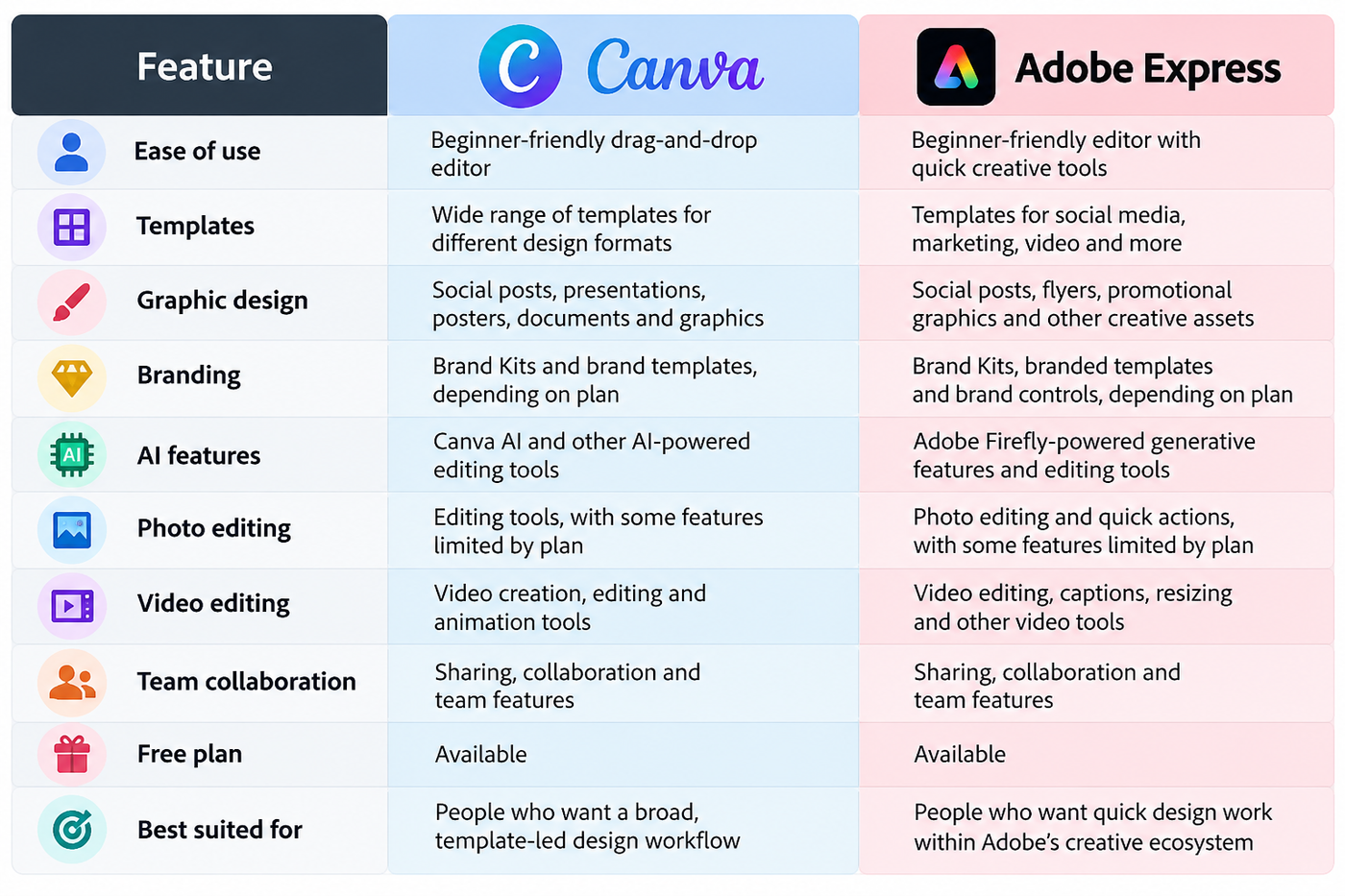
Feature availability depends on the plan, region and current product offering. Check the official Canva pricing page and Adobe Express pricing page before choosing a subscription.
What Is Canva?
Canva is an online design platform that helps people create graphics, presentations, videos, documents and other visual content through a template-based editor.
You can start with a ready-made design, replace the text and images, adjust the colours, add your logo and export the finished work. This makes it useful for people who need to create content regularly without building every design from scratch.
For example, a small skincare brand can use Canva to create Instagram posts, product announcements, promotional banners and presentation slides while keeping its colours and fonts consistent.
Canva also offers AI-powered tools, collaboration features and Brand Kits. The tools available to you depend on your plan.
What Is Adobe Express?
Adobe Express is an online content creation tool for making social media graphics, flyers, promotional materials, videos and other visual assets.
It combines templates and quick editing tools with features from Adobe's creative ecosystem. Depending on the feature and subscription, users can access Adobe Fonts, Adobe Stock assets, generative AI features powered by Adobe Firefly and brand management tools.
For example, a freelance designer could use Adobe Express to prepare social media graphics for a client, resize content for different platforms and create branded promotional material without opening a more advanced desktop design application for every task.
Adobe Express is different from professional desktop applications such as Photoshop and Illustrator. It is designed to make many everyday creative tasks more accessible, rather than replace every advanced design workflow.
Canva vs Adobe Express: Key Differences
1. Ease of Use
Both Canva and Adobe Express are designed to make everyday design work accessible to beginners.
Canva is particularly useful when you want to select a template, change a few elements and finish a design quickly. Its broad template library makes it easy to start projects for different purposes.
Adobe Express also offers templates and quick actions that simplify common editing tasks. It can be a convenient option for users who already work with Adobe products.
Which is easier? If you prefer starting with ready-made templates and editing them, Canva is a natural starting point. If you already use Adobe's creative tools, Adobe Express may fit your workflow better.
2. Templates and Design Flexibility
Templates help you avoid starting with a blank page, but their quality alone does not determine the quality of the final design.
Canva offers templates for social media posts, presentations, posters, documents, invitations and many other formats. Adobe Express also provides templates for social media, marketing materials, videos and promotional content.
The important difference is how comfortably you can adapt a template to your needs.
Imagine you need to create a promotional banner for a new product. You might find a suitable layout in either tool. Your next steps would be to change the typography, adjust the spacing, add product images and make sure the design matches the brand.
Before choosing, try editing the same template on both platforms. Check how easily you can adjust individual elements, align objects, change fonts and maintain a consistent layout.
3. Which Is Better for Graphic Design?
The answer depends on the kind of graphic design you do.
Canva is a practical choice for everyday visual content, including social media graphics, presentations, posters, simple infographics and marketing materials.
Adobe Express is also useful for these tasks, particularly when you want to combine templates, quick editing and Adobe's available creative assets.
Neither tool automatically makes someone a better designer. Good graphic design still depends on typography, spacing, colour contrast, hierarchy and a clear visual message.
For complex illustration, detailed photo manipulation or advanced vector editing, you may need a more specialized application, such as Adobe Illustrator or Photoshop.
Our take: For template-led everyday design, start by testing Canva. If your workflow already depends on Adobe's assets and tools, test Adobe Express as well.
4. Which Is Better for Branding?
Branding is more than placing a logo on a design. It includes the colours, typography, imagery and visual choices that help people recognize a business.
Both Canva and Adobe Express provide features for organizing brand assets and creating branded content. The available options vary by plan.
Canva's Brand Kits can help organize brand colours, fonts and logos. Adobe Express also offers Brand Kits and branded templates, with additional brand management controls available on eligible plans.
Consider a digital marketing agency that publishes content every week. It needs Instagram graphics, blog banners, promotional creatives and presentation slides that look like they belong to the same brand.
A useful branding workflow should make it easy to reuse approved assets, apply consistent colours and fonts, and update templates without rebuilding every design.
Which is better for branding? Both can support brand consistency. Compare the brand management features you actually need, especially if several people create content for the same business.
5. Canva vs Adobe Express AI Features
Both platforms offer AI-powered creative tools, but individual features and usage limits can change.
Canva provides Canva AI and a range of AI-assisted design and editing tools. Depending on availability and plan, these can help users generate visual content, edit images and speed up parts of the design process.
Adobe Express includes generative AI features powered by Adobe Firefly, along with editing tools designed to simplify common creative tasks. Access and usage limits depend on the feature and subscription.
For example, suppose you need a background image for a product promotion. An AI tool may help you generate or modify a visual, but you will still need to check whether the result matches your brand, has the right composition and leaves enough space for text.
When comparing AI features, look at:
- The specific tools available on the free and paid plans.
- Monthly usage allowances or generative credits.
- Whether the tool can edit an existing image or only generate new content.
- How much control you have over the final result.
- The terms and licensing conditions relevant to your intended use.
Do not choose a platform simply because it has more AI features. Choose the tools that help you complete your actual design tasks.
6. Photo Editing and Image Background Removal
Photo editing matters when you create product graphics, advertisements, thumbnails and promotional materials.
Both platforms provide image editing capabilities, but advanced features may require a paid plan.
For example, an online store might need a product image with its background removed. A social media manager might need to crop a photograph, adjust its appearance and prepare different versions for several platforms.
Test the tools using an image you commonly work with. Check the quality of the result, how much manual correction is needed and whether the required feature is included in your plan.
For more detailed photo manipulation, Photoshop or another dedicated image editor may be more suitable.
7. Video Editing and Social Media Content
Social media work increasingly involves both static graphics and short videos. The right tool should support the formats you publish regularly.
Canva offers video creation and editing features alongside its graphic design workflow. Adobe Express provides video tools such as trimming, resizing and caption-related features, with availability depending on the plan.
Imagine you manage a brand's Instagram account. Each week, you need carousel posts, Reel covers, short promotional videos and campaign graphics.
Instead of comparing only the number of video features, check whether each platform lets you complete this entire workflow comfortably. Look at editing controls, text placement, captions, resizing and exporting.
If your work involves advanced timelines, detailed motion graphics or complex video effects, a dedicated video editor may be a better fit.
8. Team Collaboration and Client Work
For freelancers, agencies and in-house marketing teams, collaboration can matter as much as the editing tools.
Both platforms support ways to share creative work, but their team features and permissions vary by subscription.
Before selecting a tool for client projects, check whether it supports:
- Sharing designs with clients for review.
- Comments and feedback.
- Reusable branded templates.
- Suitable permissions for team members.
- Version history and access to previous work.
- Clear ownership and organization of brand assets.
For example, if three people create content for one business, a shared set of approved templates can help maintain consistency. It also reduces the chance of someone using an outdated logo or the wrong brand colour.
Compare the collaboration features included in your intended plan rather than assuming every option is available for free.
Canva vs Adobe Express for Different Types of Users
The best tool depends on what you create most often.
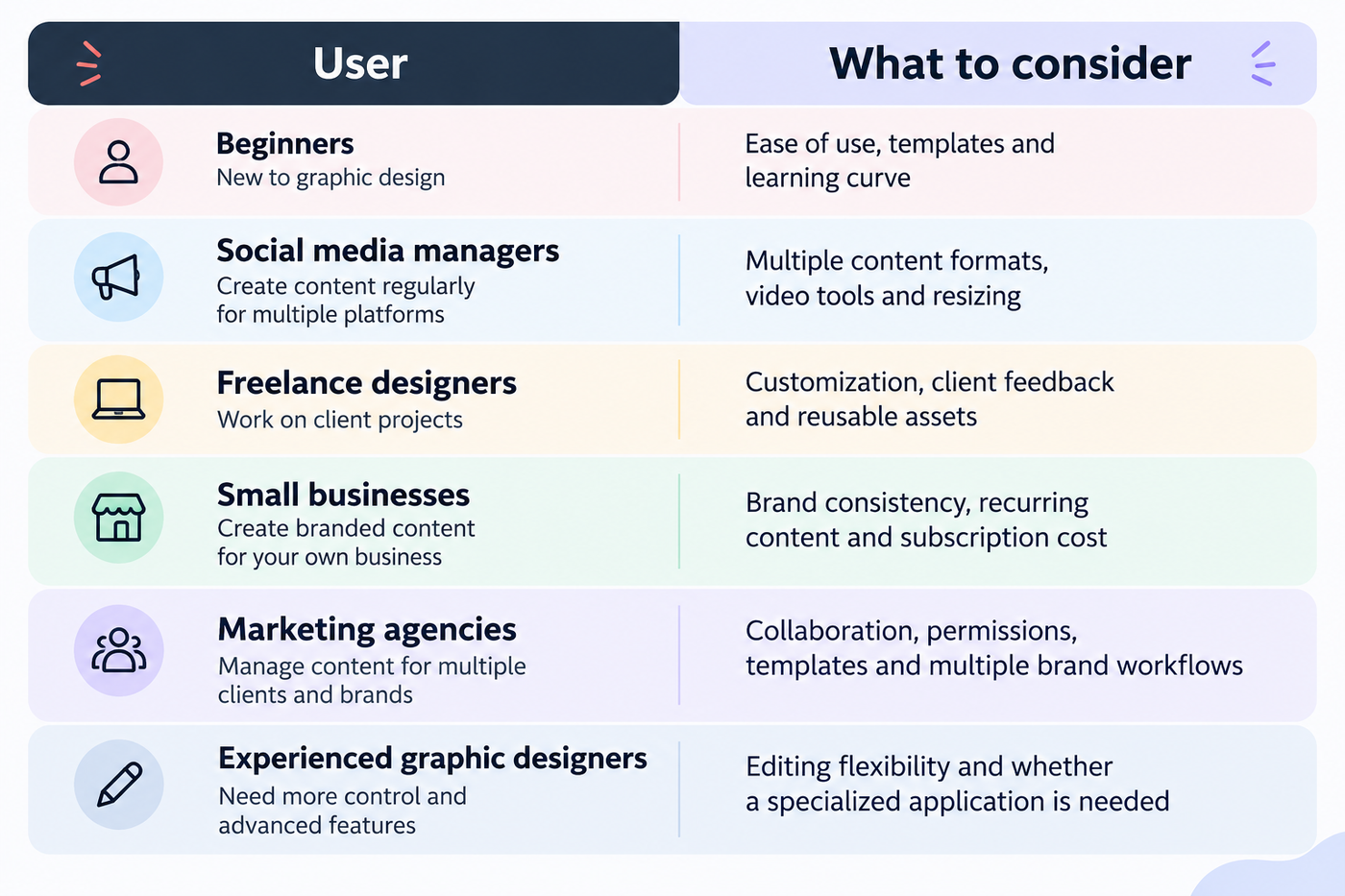
A beginner who creates occasional social posts may need a different setup from an agency managing several client brands. Start with your actual requirements instead of choosing a tool based on popularity alone.
Canva vs Adobe Express: Free vs Paid Plans
Both platforms offer free and paid options. The difference is not simply whether you can design without paying; it is which features, assets and limits matter to your workflow.
Canva's paid plans can provide access to additional premium content, AI features, Brand Kits and other tools. Adobe Express's paid plans can provide access to additional templates, Adobe Stock assets, fonts, editing features and other benefits.
Before upgrading, compare the following:
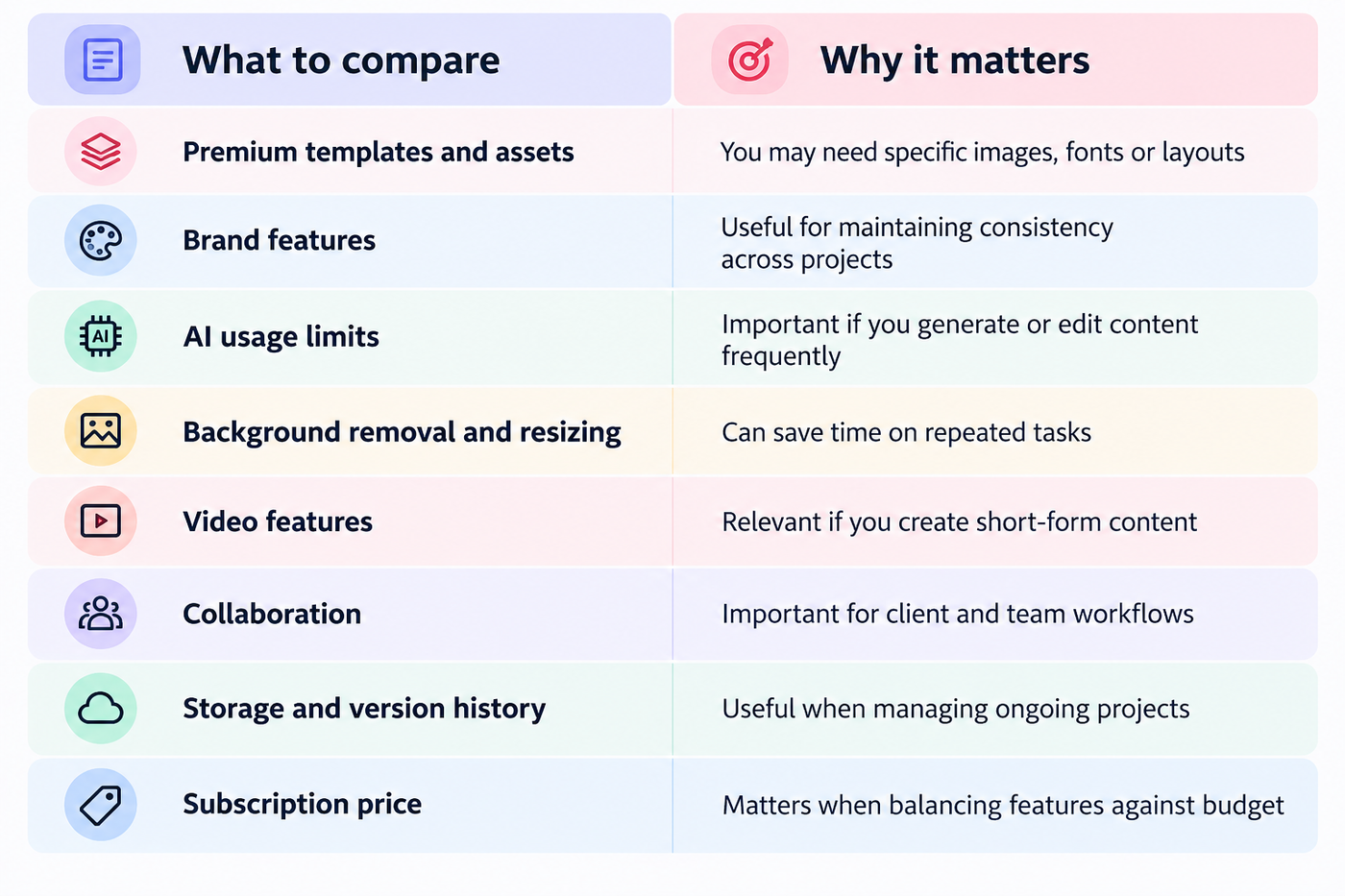
Tip: Start with the free plan if it covers your needs. Upgrade only when a specific limitation regularly affects your work. Check the official pricing pages before paying because plan names, prices and included features can change.
A Practical Test: Create the Same Design in Both Tools
A useful way to compare Canva and Adobe Express is to complete the same brief in each platform.
Use this example: create an Instagram promotional post for a skincare brand.
Design brief
- Use the same logo, product photograph and brand colours.
- Create a square social media post.
- Add a short headline and supporting text.
- Keep the layout readable on a mobile screen.
- Export the final design for social media.
Then evaluate both results using the same criteria.
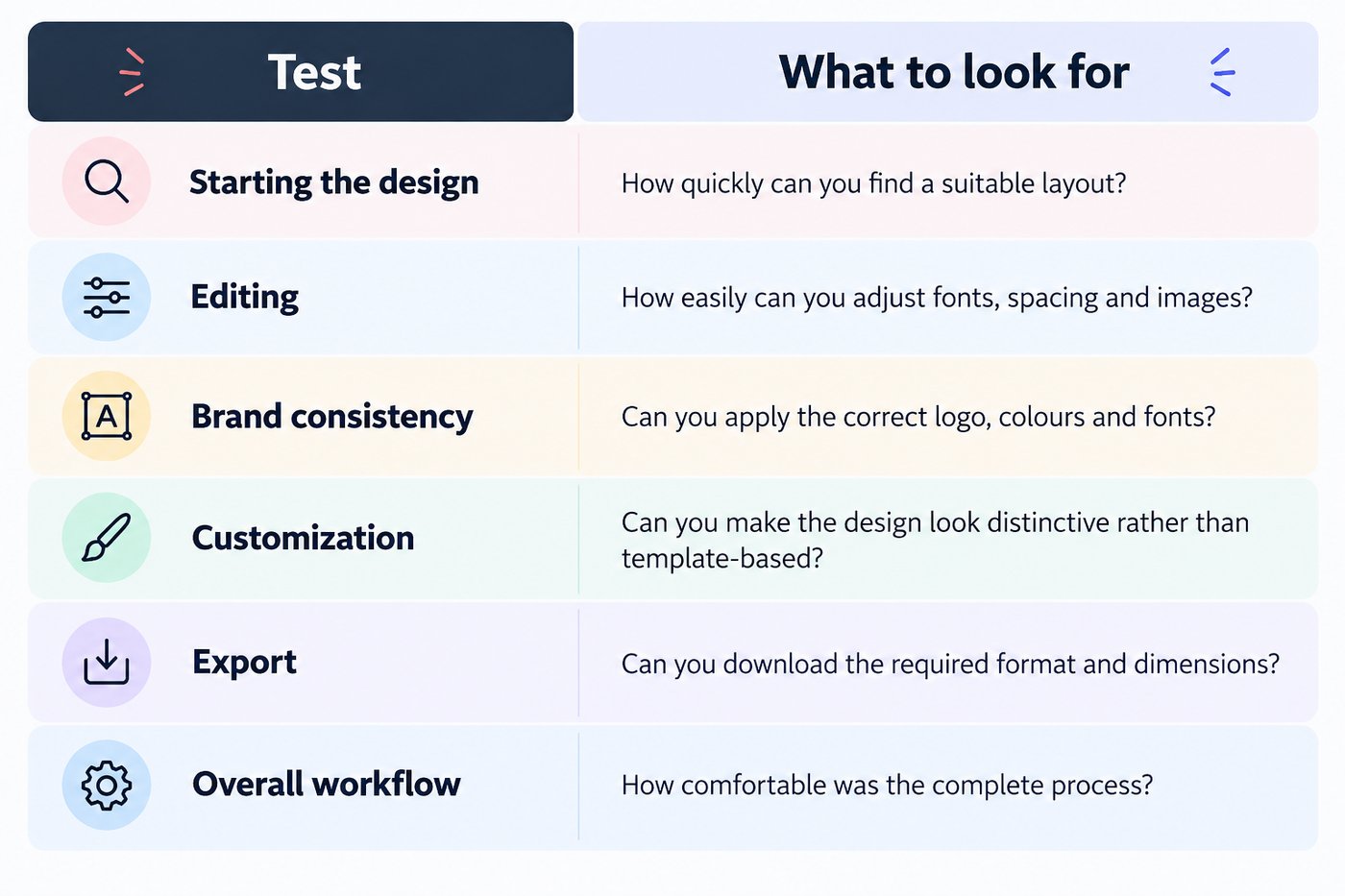
Do not assume one tool is faster or produces better designs before testing it. Your result may depend on your experience, the template you select and the complexity of the brief.
This simple exercise can help you identify which platform works better for your everyday tasks.
Pros and Cons of Canva and Adobe Express
Canva
Pros
- Broad range of templates and design formats.
- Accessible editing workflow for beginners.
- Brand Kits and reusable design assets.
- Supports many everyday graphic design and content creation tasks.
Cons
- Some premium assets and features require a paid plan.
- Template-based designs can look similar without thoughtful customization.
- It may not offer all the specialized controls needed for complex design work.
Adobe Express
Pros
- Templates and quick editing tools for everyday creative work.
- Integration with Adobe's creative ecosystem and available assets.
- Brand management and collaboration options on eligible plans.
- AI-powered creative features for supported tasks.
Cons
- Some useful features require a paid subscription.
- Available tools and limits differ across plans.
- Complex illustration, advanced photo manipulation and detailed motion work may require other software.
These are general considerations, not universal limitations. Test the features relevant to your projects before deciding.
Common Mistakes to Avoid When Choosing a Design Tool
Choosing only by template count
A large template library is useful, but it does not guarantee that the final design will suit your brand. Look at editing flexibility and the quality of the finished result.
Ignoring brand consistency
A business can publish attractive designs that still look disconnected from one another. Reusable brand assets, consistent typography and clear visual rules matter more than the tool itself.
Paying for features you rarely use
A premium subscription may not be necessary if you only create a few simple graphics each month. Check what you actually need before upgrading.
Expecting a design tool to replace design skills
Templates and AI can speed up production, but they do not automatically create strong visual hierarchy, readable layouts or a recognizable brand identity.
Forgetting export requirements
Before starting a project, confirm the required file format, dimensions, transparency and quality. A tool is only useful if it can deliver the output your project needs.
Which Tool Should You Choose?
There is no single winner for every graphic design and branding task.
Choose Canva if you want a broad selection of templates and a straightforward workflow for social media posts, presentations, marketing graphics and everyday content.
Choose Adobe Express if you want accessible design and editing tools that work alongside Adobe's available fonts, stock assets and creative features.
Consider both if you regularly create content for clients or brands and want to compare their templates, editing experience, collaboration features and pricing directly.
For advanced illustration, detailed image manipulation or complex motion graphics, consider whether you need a more specialized tool in addition to either platform.
The best choice is the one that supports your actual workflow, keeps your designs consistent and gives you the features you need without unnecessary expense.
Frequently Asked Questions
1. Is Canva better than Adobe Express?
Canva may suit people who prefer a broad, template-led design workflow. Adobe Express may be a better fit for users who want quick content creation alongside Adobe's creative ecosystem. The right choice depends on your tasks and preferred workflow.
2. Is Adobe Express easier to use than Canva?
Both tools are designed to simplify common design tasks. Ease of use depends on the project, your previous experience and how comfortable you feel with each editor.
3. Which is better for graphic design and branding?
Both can create branded graphics and everyday marketing materials. Compare their customization tools, brand management features and export options against the needs of your business.
4. Can you create a brand kit in Canva and Adobe Express?
Yes. Both platforms offer brand-related features, although the available tools and limits depend on your subscription. Check the current plan details before choosing one for team-wide brand management.
5. Which is better for social media posts?
Both support social media graphics and other content formats. Compare their templates, resizing tools, video capabilities and publishing workflow to see which better fits your schedule.
6. Is Canva or Adobe Express better for beginners?
Both are suitable starting points for everyday design. Beginners can try the free plans and create the same sample project in each to compare the learning experience.
7. Can you use Canva and Adobe Express for free?
Both offer free plans. However, premium assets, advanced editing tools and some AI features may require a paid subscription or have usage limits.
8. Which tool has better AI features?
Neither is automatically better for every task. Compare the specific AI tools you need, their output quality, usage limits and the level of editing control they provide.
9. Can Canva or Adobe Express replace Photoshop or Illustrator?
They can handle many everyday design tasks, but they do not replace every advanced feature in specialized desktop applications. Detailed image manipulation and complex vector illustration may require Photoshop, Illustrator or another dedicated tool.
10. Should a business use both Canva and Adobe Express?
It can make sense if the tools serve different purposes in your workflow. However, using both is not essential. Start with the platform that covers your main needs and add another only when it provides a clear benefit.
Final Thoughts
Canva vs Adobe Express is not simply a contest between two design tools. It is a decision about how you want to create, edit and manage visual content.
For template-led design and recurring marketing content, Canva is worth testing first. If Adobe's creative ecosystem and available assets are important to your workflow, Adobe Express deserves a closer look.
Try the free versions, create the same design in both and compare the final output, editing experience and available features. That will give you a more useful answer than choosing based on a feature list alone.