
Best Free AI Tools for Digital Marketing in 2026
 Sachin Gupta2 Nov 2026
Discover free AI tools for digital marketing, including SEO, content writing, social media, design and analytics. Learn their uses and benefits.
Summarize this article with AI
Digital marketing involves many different tasks, from researching keywords and writing blogs to designing social media posts, editing videos, managing campaigns and understanding website performance. Completing all these tasks manually can take hours, especially for small businesses, freelancers and beginners.
The best free AI tools for digital marketing can help make this work easier. Some tools generate ideas and draft content, others help create designs or edit videos, while analytics and SEO platforms provide information about how a website performs. The important thing is to understand which tool solves which problem.
In this guide, we have classified more than 25 AI and digital marketing tools by their purpose. You will learn what each tool does, how marketers can use it, practical examples, and what to know about its free version before signing up. The goal is to help you choose useful tools without spending money on software you may not need.
What Are AI Tools for Digital Marketing?
AI tools for digital marketing are applications that use artificial intelligence to assist with tasks such as writing, research, design, video editing, customer communication and campaign planning. Other digital marketing tools help users analyse website traffic, research keywords, schedule posts or manage leads without necessarily using AI.
For example, a marketer can use ChatGPT to prepare a blog outline, Canva to create a featured image, Google Search Console to check search performance and Google Analytics to understand website activity. Each tool has a different role.
AI tools can save time, but they do not automatically guarantee accurate content, better rankings or more sales. Marketers still need to verify information, understand their audience and evaluate results.
Best Free AI Tools for Digital Marketing in 2026
The following tools are grouped by the work they help you complete. Free-plan features and limits can change, so check the linked official pricing pages before relying on a particular feature.
1. AI Tools for Content Writing and Blog Creation
These tools help marketers brainstorm topics, prepare outlines, draft content and improve existing writing.
ChatGPT - Best for Content Ideas and First Drafts
ChatGPT is an AI assistant that can help create blog outlines, social media captions, email drafts, product descriptions and content briefs. You can give it information about your audience, business and writing style to make its suggestions more relevant.
For example, a digital marketing agency targeting businesses in Delhi could ask ChatGPT to brainstorm article topics about local SEO. The marketer can then research search demand, check existing articles and select a topic that provides new value.
ChatGPT offers a free plan with access to core features, including writing assistance and search, but certain tools have usage limits.
Best for: Blog ideas, first drafts, content planning and rewriting.
Official website: https://chatgpt.com/
Google Gemini - Best for Brainstorming and Topic Exploration
Google Gemini is an AI assistant that helps users understand topics, organise information and develop content ideas. It can help generate questions that customers might ask, suggest article outlines and explain unfamiliar concepts.
For example, a skincare business could use Gemini to brainstorm common questions about skincare routines. The business should then verify ingredient-related claims through reliable sources before publishing an article.
Gemini offers free access, with feature availability and usage limits depending on the current plan.
Best for: Brainstorming, topic explanations and research assistance.
Official website: https://gemini.google.com/
Claude - Best for Long-Form Writing and Editing
Claude is an AI assistant that can help draft articles, review long documents, organise information and improve writing clarity. It is especially useful when you want to refine existing content without losing its original meaning.
For example, a writer could provide a technical article about website indexing and ask Claude to explain the concept in simple English for beginners. The writer should review the result to ensure that technical details remain correct.
Claude has a free plan with limited usage. Available features and usage capacity depend on the current plan.
Best for: Long-form writing, editing, document analysis and simplifying explanations.
Official website: https://claude.ai/
Grammarly - Best for Grammar and Clarity
Grammarly helps identify spelling mistakes, grammar problems and unclear sentences. It can be used to review blogs, emails, website copy and social media captions before publication.
For example, after writing a blog post, a marketer can use Grammarly to identify awkward sentences and improve readability. The final edit should still reflect the brand's voice and the intended meaning.
Its free offering covers core writing assistance, while some advanced suggestions require a paid plan.
Best for: Proofreading, grammar and writing clarity.
Official website: https://www.grammarly.com/
2. Free Tools for SEO and Keyword Research
SEO tools help marketers investigate search demand, review website issues and understand how pages appear in search results. Some provide real search data, while others offer research suggestions.
Google Search Console - Best for Google Search Performance
Google Search Console is a free Google service that shows how a website performs in Google Search. Its reports include search queries, clicks, impressions, average position and indexing information.
For example, if a blog receives impressions but few clicks, a marketer can review the queries and check whether the title accurately reflects the content users are searching for.
Search Console does not automatically explain every ranking problem, but it provides useful evidence for further investigation.
Best for: Search performance, indexing checks and identifying content opportunities.
Official website: https://search.google.com/search-console/about
Google Trends - Best for Search Interest and Seasonal Topics
Google Trends helps compare interest in search terms over time and across regions. Marketers can use it to investigate seasonal topics and explore whether interest in a subject is rising or falling.
For example, an Indian retailer could compare interest in festive shopping topics across different periods to plan relevant content.
Google Trends shows relative search interest rather than exact monthly search volume, so its results should not be treated as precise keyword-volume figures.
Best for: Trend research, seasonal planning and topic exploration.
Official website: https://trends.google.com/trends/
Ahrefs Webmaster Tools - Best for Website SEO Audits
Ahrefs offers free tools for eligible users, including selected Site Audit and Site Explorer features. Website verification is required for certain reports, and the free account has defined limits.
A marketer can use its Site Audit feature to investigate technical SEO problems, while Site Explorer can help review available backlink and keyword information for a verified website.
Its free account does not provide unrestricted access to every paid Ahrefs feature, including the full Keywords Explorer experience.
Best for: Technical SEO audits and selected backlink reports.
Official website: https://ahrefs.com/webmaster-tools
Ubersuggest - Best for Preliminary Keyword Research
Ubersuggest provides keyword suggestions and selected SEO research features. It can help marketers generate related search terms and investigate potential content topics.
For example, a business targeting the keyword “digital marketing agency in Delhi” can use keyword research tools to identify related terms worth investigating. Search demand and competition should be checked before choosing the final target keyword.
Ubersuggest has limited free access; the number of searches and available features depend on the current offering.
Best for: Keyword ideas and preliminary competitor research.
Official website: https://neilpatel.com/ubersuggest/
Screaming Frog SEO Spider - Best for Technical Website Checks
Screaming Frog SEO Spider crawls websites and helps identify issues such as broken links, missing page titles, missing meta descriptions and redirect problems.
For example, a marketer auditing a business website can use it to find pages with missing metadata before making corrections.
The free version allows crawling up to 500 URLs per crawl. Larger crawls and some advanced features require a licence.
Best for: Technical SEO audits and on-page issue detection.
Official website: https://www.screamingfrog.co.uk/seo-spider/
3. Free Tools for Graphic Design and Social Media Creatives
These tools help marketers create visual content without needing advanced graphic design skills.
Canva - Best for Social Media Graphics
Canva provides templates and a visual editor for creating social media posts, carousel designs, Pinterest pins, presentations and blog images.
For example, a business can create a Pinterest graphic for a blog post and prepare matching Instagram visuals using the same brand colours and typography.
Canva has a free plan that includes templates, design tools and selected AI features. Some premium assets and AI capabilities have usage restrictions or require a paid plan.
Best for: Social media graphics, Pinterest pins and blog featured images.
Official website: https://www.canva.com/
Adobe Express - Best for Quick Branded Designs
Adobe Express helps users create social media graphics, promotional materials and other visual content through templates and editing tools.
A small business can use it to prepare a campaign banner or a promotional graphic without building the design from scratch.
It offers free access alongside paid features, so check whether the specific templates and AI features you need are included.
Best for: Promotional designs, branded graphics and quick content creation.
Official website: https://www.adobe.com/express/
4. Free Tools for Video Editing and AI-Assisted Video Creation
Video tools help marketers prepare short videos, product demonstrations, interviews and social media content.
CapCut - Best for Reels and Short Videos
CapCut offers video editing tools for trimming clips, adding text, arranging scenes and preparing short-form videos. Selected AI-assisted features can also support video production.
For example, a marketer can edit a product demonstration, add captions and adjust the format for a vertical social media video.
Basic editing is available without a paid subscription, but some advanced features, templates, effects and export options may require payment.
Best for: Reels, short videos, captions and basic video editing.
Official website: https://www.capcut.net/
Descript - Best for Editing Talking-Head Videos
Descript combines audio and video editing with transcription and text-based editing features. Its workflow can make it easier to edit interviews, podcasts and videos in which someone speaks directly to the camera.
For example, a marketer can use a transcript to locate a section of an interview and edit the corresponding video content.
Descript offers a free plan with limits on media processing and other features. Check the current pricing page for the exact allowances.
Best for: Interviews, podcasts and talking-head videos.
Official website: https://www.descript.com/
VEED - Best for Online Video Editing and Subtitles
VEED is a browser-based video editor with tools for trimming clips, adding subtitles and preparing video content.
A business could use it to prepare a short explainer video with captions for viewers watching without sound.
Free access has restrictions that may apply to exports, features or branding, depending on the current plan.
Best for: Online video editing, subtitles and simple explainer videos.
Official website: https://www.veed.io/
5. Free Tools for Social Media Management and Scheduling
These tools help organise content calendars and publish posts across supported platforms.
Buffer - Best for Scheduling Social Media Posts
Buffer helps users prepare, organise and schedule social media content. It also provides an AI Assistant for selected writing tasks.
For example, a freelancer managing a small number of social accounts can plan captions and schedule upcoming posts in advance.
Buffer's published free plan includes up to three connected channels and up to ten scheduled posts per channel at a time. Other features and limits depend on the current plan.
Best for: Content calendars and social media scheduling.
Official website: https://buffer.com/
Meta Business Suite - Best for Facebook and Instagram Management
Meta Business Suite helps eligible users manage Facebook Pages and Instagram professional accounts. Depending on account permissions and available features, users can schedule supported content, respond to messages and review performance insights.
For example, a small business can plan Facebook and Instagram posts from one place instead of managing every publishing task separately.
Meta Business Suite is a management platform, not a general-purpose AI writing tool. Its available functions depend on the connected accounts and Meta's current features.
Best for: Facebook and Instagram publishing and account management.
Official website: https://business.facebook.com/
Metricool - Best for Social Media Analytics and Planning
Metricool combines social media planning, publishing and performance reporting for supported platforms.
A marketer can use it to organise upcoming posts and review available metrics to understand which content receives more attention.
Metricool offers free access with account, history and feature limits. Check its current plan before connecting multiple client accounts.
Best for: Social media planning and performance reporting.
Official website: https://metricool.com/
6. Free Tools for Website Analytics and Customer Behaviour
These tools help marketers understand what happens after visitors arrive on a website.
Google Analytics 4 - Best for Website Traffic and Conversions
Google Analytics 4 measures website and app activity, including traffic sources, engagement and configured conversion events.
For example, a business can compare traffic from organic search and social media to understand which channels bring visitors who complete actions such as submitting an enquiry form.
Standard GA4 access is available without a paid subscription, but tracking must be configured correctly for the reports to be useful.
Best for: Website traffic, engagement and configured conversion measurement.
Official website: https://analytics.google.com/
Microsoft Clarity - Best for Understanding Visitor Behaviour
Microsoft Clarity provides features such as session recordings and heatmaps that help website owners investigate how people interact with pages.
A marketer can review available recordings to identify where visitors hesitate, click repeatedly or struggle to use a page.
Clarity is available free of charge under its service terms. Its recordings show observed behaviour, but the reasons behind that behaviour still need to be investigated.
Best for: Heatmaps, session recordings and usability research.
Official website: https://clarity.microsoft.com/
7. Free Tools for Email Marketing and Lead Management
Email and CRM platforms help businesses organise contacts, manage enquiries and communicate with customers.
HubSpot - Best for Lead and Contact Management
HubSpot provides CRM functionality and selected marketing tools. Its free offerings can help businesses organise contacts, manage leads and use available website forms or marketing features.
For example, an agency receiving enquiries from its website can record contact details and track which enquiries need a response.
HubSpot has free tools, but advanced automation, reporting and other features may require paid products or upgrades.
Best for: Contact management and basic lead workflows.
Official website: https://www.hubspot.com/products/marketing/free
Mailchimp - Best for Email Campaigns
Mailchimp helps businesses create email campaigns, organise subscribers and manage marketing communications.
For example, an online store can prepare a newsletter to inform subscribers about new products or useful content.
Mailchimp's available free plan, eligibility criteria and contact or sending limits can change. Check its current pricing page before choosing it for a campaign.
Best for: Newsletter creation and basic email marketing.
Official website: https://mailchimp.com/
Brevo - Best for Email and Customer Communication
Brevo offers email marketing, contact management and customer communication features.
A business can use it to prepare email campaigns and organise customer communication within the limits of its selected plan.
Brevo's published free plan includes a daily email-sending allowance, currently listed as 300 emails per day. Other features and restrictions should be checked on its official pricing page.
Best for: Email campaigns and basic customer communication.
Official website: https://www.brevo.com/
8. Free Tools for Research, Sources and Marketing Ideas
These tools help marketers investigate subjects, discover sources and monitor information relevant to their work.
Perplexity - Best for Research and Source Discovery
Perplexity is an AI-powered search and answer tool. It responds to questions using information from sources it identifies and provides citations that help users investigate the topic further.
For example, before writing about a change in local SEO, a marketer can ask Perplexity to find relevant documentation, reports and industry coverage. The marketer should open the original sources and verify that they support the claims being used.
Perplexity has a free Standard plan that includes basic searches and a limited amount of Pro Search functionality. Advanced models and additional features may require a paid plan.
Best for: Initial research, finding sources and exploring unfamiliar subjects.
Official website: https://www.perplexity.ai/
Google Alerts - Best for Monitoring Industry Topics
Google Alerts sends email notifications when Google identifies new results matching selected topics or phrases.
For example, an agency can create alerts for industry developments, important competitors or changes involving a specific product category.
Google Alerts is a monitoring tool rather than a dedicated AI research assistant. The usefulness of its notifications depends on the selected terms and available search results.
Best for: Monitoring topics, brand mentions and industry updates.
Official website: https://www.google.com/alerts
Meta Ad Library - Best for Competitor Ad Research
Meta Ad Library allows users to search publicly available advertisements across Meta's platforms.
A marketer can examine how different businesses present their offers, structure their messaging and use creative formats in active advertisements.
The library does not reveal every advertiser's sales results or profitability. It is a source of competitive observations, not proof that a particular advertisement performs well.
Best for: Advertising research and creative inspiration.
Official website: https://www.facebook.com/ads/library/
9. Free Tools for Workflow Automation
Automation tools connect applications or reduce repetitive work. They can help marketers organise information and perform routine tasks with fewer manual steps.
Zapier - Best for Simple App Integrations
Zapier connects supported applications through automated workflows called Zaps.
For example, a business may create a workflow that sends a notification when a new lead is added to a connected form or spreadsheet, provided the required integrations and actions are supported by its plan.
Zapier offers a free plan with a limited task allowance and restrictions on workflow features. Check the current pricing page before building a workflow around it.
Best for: Simple integrations, notifications and repetitive tasks.
Official website: https://zapier.com/
Make - Best for Visual Multi-Step Workflows
Make provides a visual interface for connecting applications and building workflows with multiple steps.
For example, a marketer could explore a workflow that takes new form submissions, organises the information and sends a notification to the relevant team.
Make has free access with usage limits. Available operations, scheduling frequency and other features depend on the current plan.
Best for: Connecting marketing applications and organising multi-step workflows.
Official website: https://www.make.com/
Which Free Tool Should You Choose for Each Marketing Task?
The following comparison helps you select a tool based on what you want to accomplish.
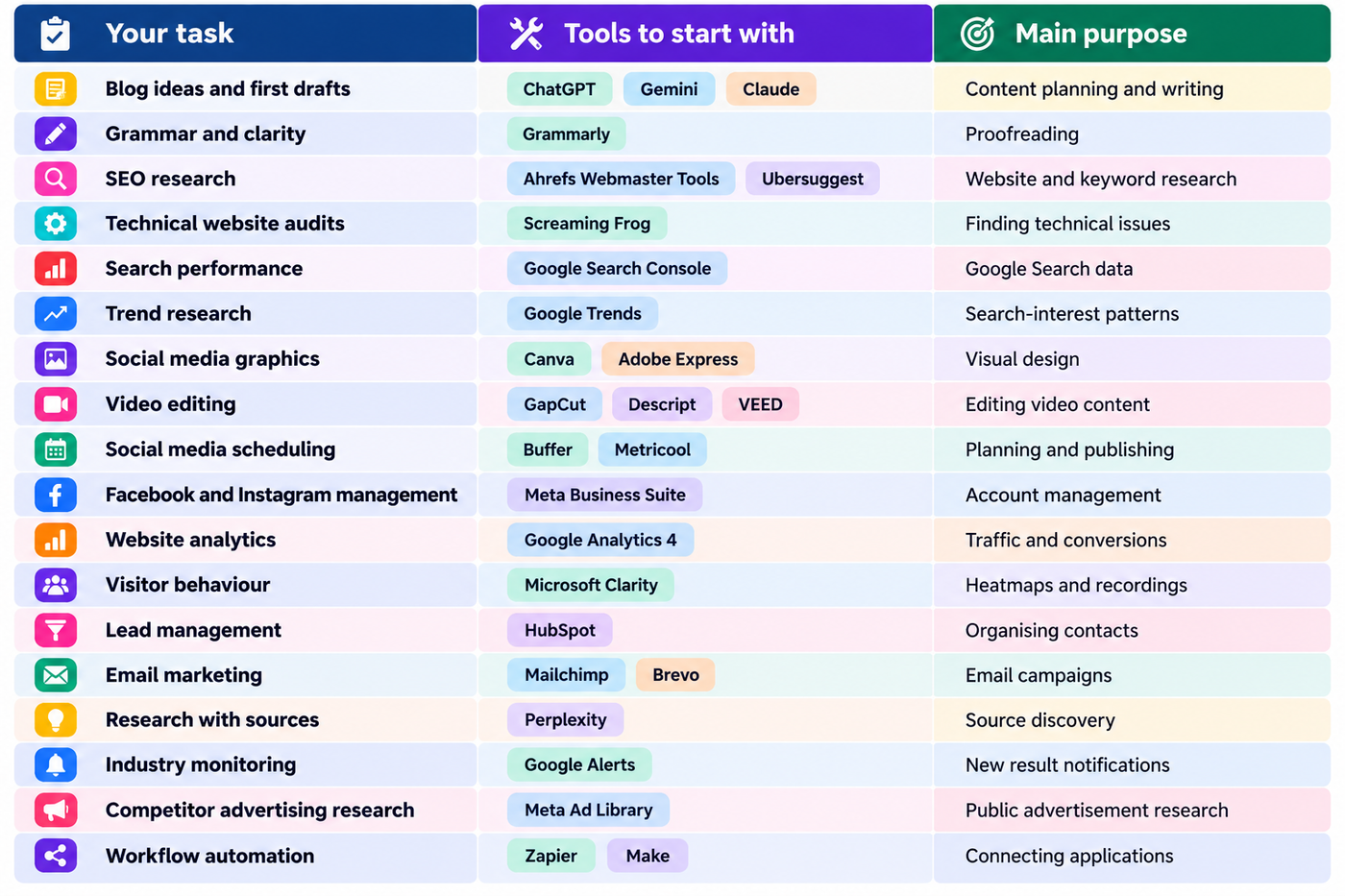
Not all the tools in this table are AI-powered. Some provide real data, while others manage publishing, communication or workflows. Both categories can be useful in a digital marketing process.
How to Use Free AI Tools for Digital Marketing Together
You do not need every tool in this guide. Start with a small workflow that solves a real problem.
Step 1: Research the topic
Use Google Trends to investigate interest in a subject and Google Search Console to review queries for your website. Perplexity can help locate sources, while an AI assistant can organise research questions and prepare an initial content brief.
Step 2: Write and review the content
Use ChatGPT, Gemini or Claude to prepare an outline or first draft. Verify factual claims and add original examples. Use Grammarly to review grammar and clarity before publishing.
Step 3: Create the visuals
Use Canva or Adobe Express for blog images and social media graphics. If you are creating videos, consider CapCut, Descript or VEED, depending on your editing needs.
Step 4: Schedule your content
Use Buffer, Metricool or Meta Business Suite to organise supported posts. Adapt content to the platform and audience rather than publishing the same material everywhere without review.
Step 5: Measure the results
Use Google Search Console to review organic search performance and Google Analytics to measure website activity. Microsoft Clarity can help investigate how visitors interact with important pages.
Step 6: Automate repetitive tasks
If you repeatedly transfer information between applications, explore Zapier or Make. Start with a simple workflow and check the free-plan limits before relying on it for regular business operations.
This process connects research, creation, publishing and measurement without requiring a paid subscription to every platform.
Are Free AI Tools Enough for Digital Marketing?
Free AI tools can be enough for learning digital marketing, preparing content, managing a small business website and handling basic social media tasks. However, free access does not always mean unlimited access.
Some platforms offer free core services, while others restrict the number of searches, scheduled posts, AI requests, contacts, exports or monthly operations. A free plan may also exclude advanced integrations or team features.
Before signing up, check whether the tool is genuinely free or offers only a trial, which features are included, whether AI usage is limited and whether the terms allow your intended use.
Start with free tools and upgrade only when a specific limitation affects your work. Buying more software does not automatically improve the quality of your marketing.
Frequently Asked Questions
What are the best free AI tools for digital marketing?
ChatGPT, Gemini and Claude can assist with writing and research. Canva supports design, while CapCut helps with video editing. Perplexity supports source discovery, and tools such as Google Search Console and Google Analytics provide performance data. The best combination depends on the task.
Which free AI tools are best for SEO?
ChatGPT and Gemini can support content planning, while Perplexity can help locate sources. Google Search Console provides actual Google Search performance data, Google Trends helps investigate search interest, and Screaming Frog identifies technical issues within its free crawl limit.
Is Perplexity free to use?
Perplexity offers a free Standard plan for basic searches, with limited access to advanced search features. Its current plan details are available on the official website: https://www.perplexity.ai/
Is Claude free for content writing?
Claude offers a free plan with limited usage. It can assist with drafting, editing and analysing content, but availability and usage capacity depend on the current plan. Check https://claude.ai/ for current details.
Which free tools are useful for video editing?
CapCut, Descript and VEED are options worth evaluating. They differ in editing features, export restrictions and free usage limits, so check the current terms before starting a project.
Can beginners use free AI tools for digital marketing?
Yes. Beginners can start with an AI assistant for writing, Canva for design, Google Search Console for SEO and Google Analytics for website measurement. Learning a few tools properly is usually more useful than signing up for dozens.
Are all digital marketing tools AI tools?
No. AI assistants generate or analyse content, while analytics, scheduling and SEO platforms may primarily provide data or manage workflows. Both can be useful when combined appropriately.
Do free AI tools replace digital marketers?
No. These tools can help complete tasks faster, but marketers still need to understand customers, verify information, make creative decisions and evaluate results. AI-generated content can contain errors and should be reviewed before publication.
Final Thoughts
The best free AI tools for digital marketing are not necessarily the ones with the most features. They are the ones that help you solve a real problem without adding unnecessary complexity.
Start with an AI assistant for writing and research, Canva for graphics, Google Search Console for SEO and Google Analytics for website measurement. Add a video editor, scheduling platform, email marketing service or automation tool when your needs justify it.
Most importantly, understand the difference between generating content and measuring results. AI can help you work faster, but accurate information, useful content and informed decisions remain essential to effective digital marketing.